GCAP3055
Table of Contents
- 1. Project Proposal
- 2. User Stories
- 2.1. As a student
- I want a web-based learning platform similar to Udemy
- I want to send letters to SCMP to gather material
- I want to browse letters using an app
- I want content to be categorized by theme, department, or date
- I want each project to send a report to the council
- I want lessons to be related to the materials and projects
- I want clear assessment requirements
- I want my personal information to be redacted
- I want to login securely to the platform
- 2.2. As a course instructor
- 2.1. As a student
- 3. Prototypes and Graph Section
- 4. Self Note
- 5. Test Accounts
- 6. Meeting 1 Notes
- 6.1. User-Big-Idea -> Turn to Udemy(Web Based Platform)
- 6.2. On Privacy -> Need to redact Author info /
- 6.3. To know which is effective
- 6.4. Phrase 1 -> Database / MockData.
- 6.5. Website Login.
- 6.6. HKBU cannot use SID to login.
- 6.7. Use a defined secret for Student Login.
- 6.8. Lesson
- 6.9. DB for Basic Lesson Stucture.
- 6.10. A Panel for Simon to Link Letters to Project.
- 6.11. Legcro report - Pdf / Email / (URL).
- 6.12. Week 1 Functions TBD
- 6.13. Idea from Kenny - Moodle plugin
- 7. Week 2
- 7.1. DONE Sync Email to Local Storage
- 7.2. Sync Email To MonGoDB.com
- DONE Save All info except Attachment into Mongo.
- DONE Check If DB contains Duplicate before insert
- So Need to Store BackBlaze File ID, for later genreate access link.
- Idea From Kenny:
- My revise Backend Flow is that, This backend Server will Sync files to Local, Then distribute the Files to Mongo / BackBlaze. The Backend also servers as a Authorized Body to generate links to Attachments in BB. This SImplify the Whole things.
- 8. Meeting 2:
- 9. Deployment - Via HKBU COMP K8S:
- 9.1. Deploy to K8S with webhookd
- 9.2. Deploy Vue to K8S with connection to K8S backend:
- 9.3. Run WEBHOOKD AND Build VUE APP:
- 9.4. Ask Kenny
- 9.5. Idea ->
- annotator from openannotation
- state control for token
- Email page by loading in email template viewer
- VueJS tag to display from certain page!
- Query the Page with respect to the label.
- TipTap Editr -> + MD + Annotation extension. Could be!
- So it will be MD for storing source document in DB;
- AI features -> Seems tiptap support it.
- USe Pinia state control for Token and Auth.
- 10. Meeting 4
- 10.1. Machine readable ->
- 10.2. UE -> MD
- 10.3. Put SYSTEM
- 10.4. EDITOR
- 10.5. Anontate.
- 10.6. In conclusion -> I shall find a way to convert the UE2 Book into Structured MD / JSON first.
- 10.7. Also Need to investigate the TipTap editor, and its extension -> Seems it cal fufilled the project requirement.
- 10.8. One of the goal from GCAP, is the Automatically generte an letter to the editor, by all sort of related document -> TipTap AI might Help + documents converted to MD/JSOn to feed to AI input.
- 11. Issues
- 11.1. Tiptap Annotate import error ->
- 11.2. TipTap annotation-magic code port to Vue3
- 11.3. To Support QRCode Page sharing.. - Very Easy:
- 11.4. Talk with Kenny -
- The Layout of Annotation shall be 2-8 (Annotation List to the Left)
- Wrap the Anootation data with Bootstrap.
- Share the Annotation witin the Course subscribers
- Make Click the Button Focus back on the Annotated Text.
- The Use of Object Oriented Pattern will not be good
- Also make a function to go to the Annotated word.
- 11.5. TODO
- 11.6. Meeting
- 11.7. Notes
- 11.8. Meeting
- 11.9. TODO
- Data conversion -> Pandoc is good, Now i just need to let the md-editor to know there the image at at VueJS.
- Basic Flow & Milestone for GCAP.
- Also Need to implement basic MD file Upload.
- Make the Five Milestone Page -> Connect Content to Annoatation and MD editor.
- Will revamp my UI accoring to this Video. (Milestone huh.)
- Actually I can use Google Clerk + Vue for UI Login !.
- Create PROJECT -> Page
- View Project Page
- Export
- Notifiation
- DS of Lesson revamp:
1. Project Proposal
1.1. Project Proposal: Web-Based Learning Platform for GCAP3056
- Taking a Stand: Engaging in Public Discourse through Advanced Research and Writing
- A Project based Course In which Students are required to write essay to the editor of SCMP, based on the material given by emails replies from Governments, SCMP Letters etc.
1.2. Summary
User proposes to develop a web-based learning platform that leverages project-based materials and videos. This platform will not only enhance the learning experience but also provide a comprehensive approach to project management.
1.3. Project Overview
The project aims to transition to a custom web-based platform. It will focus on delivering project-based learning experiences, with materials and lessons directly linked to current news and information.
1.4. Material Acquisition and Management
Materials will be obtained and categorized by theme, department, and date. Some materials will have restricted access to ensure the quality and relevance of content. Materials will be stored in a database for easy access and management.
1.5. Course Delivery and Assessment
Courses will be delivered through lessons related to the materials and projects. Each lesson will be accompanied by clear assessment requirements to ensure students understand the learning objectives. The platform will also feature a Q&A style format for government responses, providing a practical understanding of the subject matter.
1.6. Data Privacy and Security
The platform will prioritize data privacy, with features to remove personal information and secure login mechanisms for students. Original versions of government responses will be kept as evidence, ensuring transparency and accountability.
1.7. Future Development
The first phase of the project will focus on database creation and mock data generation, fetching data from email / attachment to the database and Basic Web UI. Future developments will include advanced features like a panel for linking letters to projects and generating the replies from the government to out letters into Q&A format for better learning outcome.
2. User Stories
2.1. As a student
I want a web-based learning platform similar to Udemy
- So that I can engage in project-based learning with materials and videos.
I want to send letters to SCMP to gather material
- So that I can use real-world content for my projects.
I want to browse letters using an app
- So that I can easily access the content anytime, anywhere.
I want content to be categorized by theme, department, or date
- So that I can easily find relevant materials for my projects.
I want each project to send a report to the council
- So that our work can be reviewed and stored for future reference.
I want lessons to be related to the materials and projects
- So that I can apply what I learn directly to my projects.
I want clear assessment requirements
- So that I know what is expected of me for each project.
I want my personal information to be redacted
- So that my privacy is protected.
I want to login securely to the platform
- So that my account and work are protected.
2.2. As a course instructor
I want a panel to link letters to projects
- So that I can provide relevant content to students.
I want to generate replies from the government to our letters into a Q&A format
- So that students can learn from real-world responses.
3. Prototypes and Graph Section
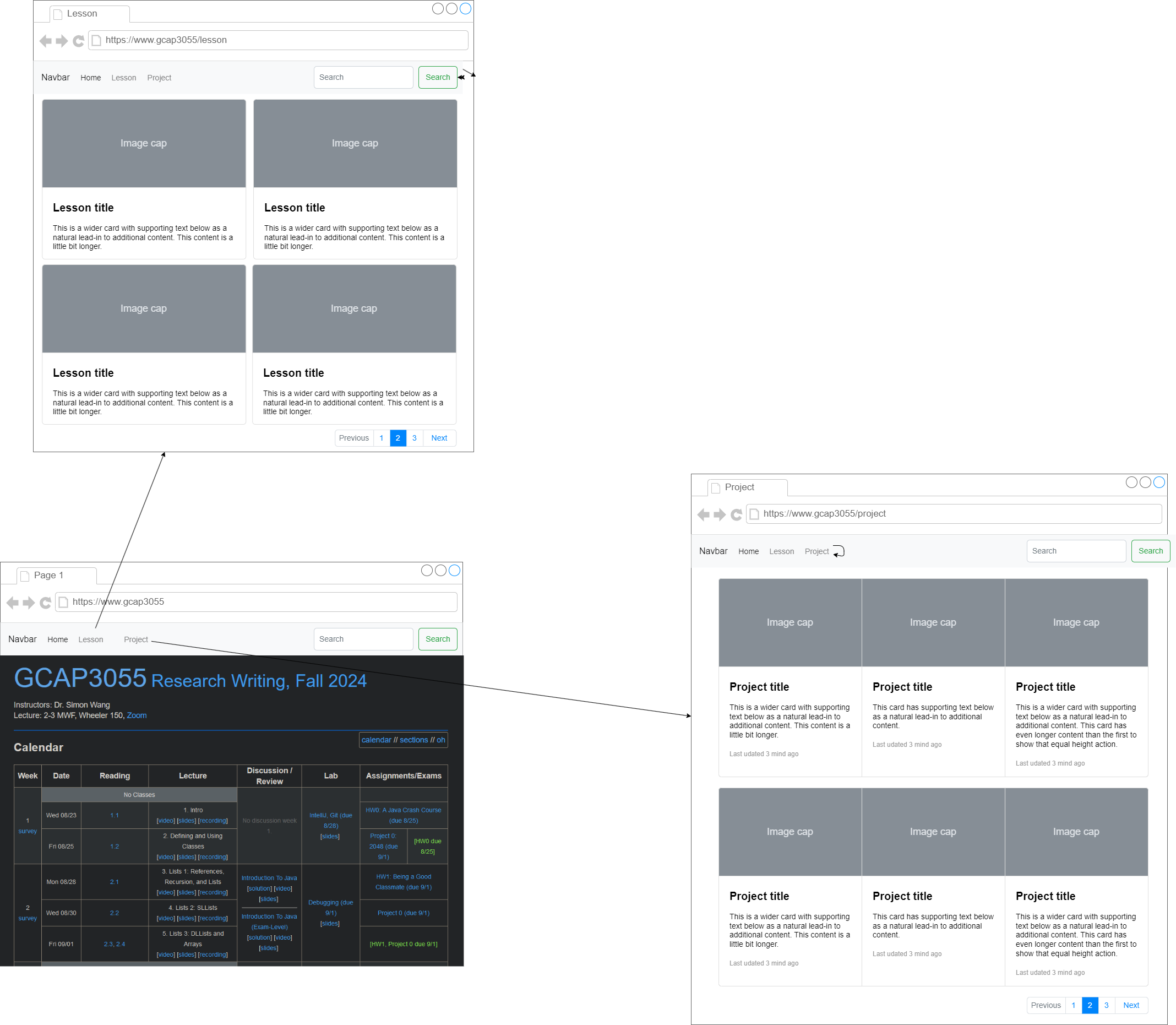
3.1. Mockup UI
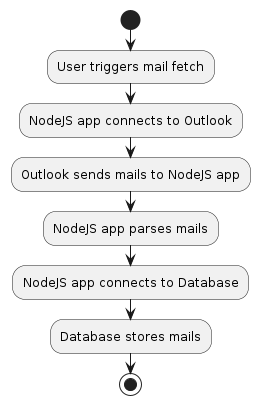
3.2. Activity Diagram
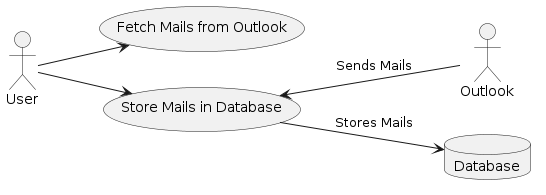
3.3. Use Case Diagram
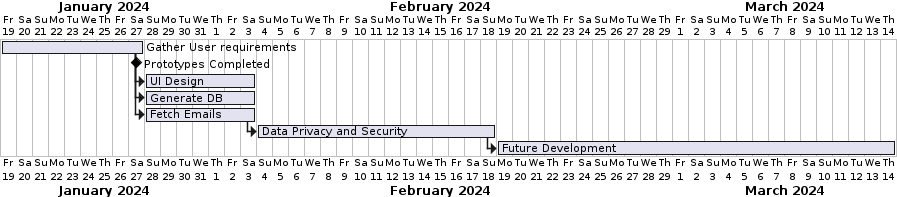
3.4. Gantt Chart 2
3.5. Database diagram - lesson

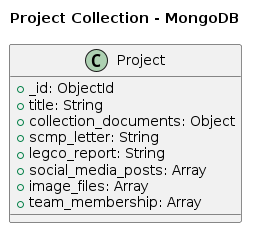
3.6. Database diagram - project
4. Self Note
4.1. Week 1
The info is basically to fetch Email attach from outlook.
Store them into DB.
Get to see them in the App.
TODO Create A Technical documentation site via ORG mode.
TODO Design Database -> MongoDB / GraphSQL/ SQL?
- For unstructured Data -> MongoDB.
Bing Chat: Yes, MongoDB can be a good choice for storing email attachments. Here are some reasons:
- Large Objects: MongoDB can easily store large objects or “files”. It can handle objects up to 100MB in size¹.
- Advantages Over File System: Unlike a file system, MongoDB can efficiently deal with millions of objects¹.
- Power of Database: With MongoDB, you can perform advanced queries to find a file, use indexes, and replicate the entire file set¹.
- GridFS: MongoDB uses a standard format called GridFS for chunking large files into multiple objects that are less than 255 KiB each¹. This allows efficient retrieval of a specific range of a given file¹.
- Binary Storage: MongoDB stores objects in a binary format called BSON¹. This ensures that the original content of the data is not changed³.
However, it’s important to note that the suitability of MongoDB for storing email attachments also depends on your specific use case and requirements. For example, if you need to perform complex queries on the data within the attachments, a different database might be more suitable. Always consider your specific needs when choosing a database..
Source: Conversation with Bing, 1/24/2024 (1) Storing Large Objects and Files in MongoDB | MongoDB. https://www.mongodb.com/developer/products/mongodb/storing-large-objects-and-files/. (2) python - Storing email into mongodb - Stack Overflow. https://stackoverflow.com/questions/8047773/storing-email-into-mongodb. (3) python - How to store E-Mail in MongoDB - Stack Overflow. https://stackoverflow.com/questions/31817528/how-to-store-e-mail-in-mongodb. (4) ETL Email Attachments data to MongoDB fast | Airbyte. https://airbyte.com/connections/email-attachments-to-mongodb-destination. (5) en.wikipedia.org. https://en.wikipedia.org/wiki/MongoDB.
- MongoDB has free DB provided
- NoSQL
TODO Decide Wether use React-Native or Flutter for this Mobile App.
TODO How to Fetch Outlook attachment -> using existing package
5. Test Accounts
- Email will be forwarded to Here for Fetching from API.
5.1. Outlook:
- Email: gcap3056@outlook.com
- Password: hkbugcap3055
– first-name:GCAP, last-name:3056
5.2. Gmail:
- Email: gcap3056@gmail.com
- Password: hkbugcap3055
5.3. WEB VUE Deploy
- email: adm1@gmail.com
- password: adm1
- email: vol1@gmail.com
- password: vol1
6. Meeting 1 Notes
6.1. User-Big-Idea -> Turn to Udemy(Web Based Platform)
- Put the material and vid to it - Project based.
- Project management ->
- Get Material -> send letter to SCMP
- If published -> Showcase.
- Use App to browse Letter.
- Categorize -> Theme / search by department / Date
- Present Letter / And the Project.
- Restricted access some material
- Each project send an report to Council -> Store in DB / app.
- Course Material
- Lesson -> Related to Materials / Project.
- List of Lesson -> (Published Letter)
- Build DB from SCMP letter
6.2. On Privacy -> Need to redact Author info /
*
- Accessment requirment -> make it Clear.
- Approach to Visualize.
- Final Deliverable
- Member management.
- Remove Personal information.
- Store GOvernment response as Q&A style.
6.3. To know which is effective
Data Analysis.
Check if The Answer is Useful. ->
Template -> List out Question.
Copy the Answer of Government to Template.
Keep Original Version.
As evidence.
First meeting strcutre
6.4. Phrase 1 -> Database / MockData.
6.5. Website Login.
6.6. HKBU cannot use SID to login.
6.7. Use a defined secret for Student Login.
6.8. Lesson
Meta data: Week /
Markdown -
6.9. DB for Basic Lesson Stucture.
6.10. A Panel for Simon to Link Letters to Project.
6.11. Legcro report - Pdf / Email / (URL).
6.12. Week 1 Functions TBD
- Basic Sync Features
- Basic Gitbooks
- Basic Admin UI
- Basic Database Structure
- Basic Web to see the Object.
6.13. Idea from Kenny - Moodle plugin
- Some funcitons can be consider to implement by Moodle plugin
- For example Material Delivery
- But Backend’s url link needs to be developed.
- External Link Provide to moodle. -> Sow the set of Materal.
- System + admin panel -> Manage
- Course -> gen dir link.
- Module -> Course / -> Each Course -> direct Link ->
7. Week 2
- Starts to implement basic functions:
7.1. DONE Sync Email to Local Storage
- Using Packages :
- Imap -> Now I can Connect with IMap.
- Imap might has bugged connection
- Changed to use pop3.
- Imap -> Now I can Connect with IMap.
- OK So the revised Flow Would be -> Use Node pop3 protocol to fetch email -> Then use node emailparse to extract the attachment / email body from the data Stream of email. And Finally Store em all into the database!.
- Man, I searched many packages -> IMAP(bugged), Azure Graph API (PAID), Google Cloud API(Paid). And Seems POP3 + Outlook to be working right now.
- Need to Fix Save and Chunk for local Storage.
- Fixed Save.
- DONE Can get missing UID and email index.
- Need to find out how to append the newly download email to local.
- Now it is Stuck at cannot download Missing Index.
- The type of the index is String.
- Fixed Single Email Sync Issue.
Idea from Kenny:
- Use Departmental Email for Imap connection: https://www.comp.hkbu.edu.hk/v1/?pid=142 -ref https://imail.comp.hkbu.edu.hk/webmail/?_task=mail&_mbox=INBOX
- Use FileSystem to Store in NodeJS: https://nodejs.org/api/fs.html
- The code Use Base64 to encode -> in da email.
7.2. Sync Email To MonGoDB.com
- NodeJS - tbc
- The Goal is to Store these email to MongoDB.com For later analysis.
- Got the Free Account.
- Setting up the DB, coleection, and the Connection String.
- Now I need to write a Function to get the exact one parsed Mail from local storage.
- Added Attachment checks for parsedEmails.
- I need not to send the HTML fragment to MonGoDB of course.
DONE Save All info except Attachment into Mongo.
DONE Check If DB contains Duplicate before insert
So Need to Store BackBlaze File ID, for later genreate access link.
Idea From Kenny:
- some 16 Mb of each File insert is max for MonGoDB
- So For Attchment, it got to save in backblaze https://www.backblaze.com/get-started
- And Just Store else String data, and Link to attachment in MonGODB.
- The Route of email/:num shall keep at least from/ to
- The Route of email/list -> Shall include more data like in /:num route.
My revise Backend Flow is that, This backend Server will Sync files to Local, Then distribute the Files to Mongo / BackBlaze. The Backend also servers as a Authorized Body to generate links to Attachments in BB. This SImplify the Whole things.
Need to fix Backblze id error for download URL generation.
Also Need to implement duplication prevent Logic of Upload.
8. Meeting 2:
8.1. Make Public / Private | anonymise Personal info
8.2. Turn Unstructual Textbook material, with metaData.
8.3. Make Machine knows the data with the Label
- Labelling scheme
- Mail / Lesseon -> Make to Paragraph.
- Texttual Data / Meta Data Layers
- Annotation
- By Paragraph / Essey / Email. -> Manual annotation.
8.4. Task
Describtion
Example > From Letter
Task -> for student to write.
Link to Moodle.
Make student write in Moodle
Use StackEdit -> To edit the Lesson Data. and Then Upload It.
* *
Annotation ->
Machine understandable format - metaData.
**
Later become Progressive Web App. -> Custom Logo, and Install
8.5. Simon will check out TO Host Course Material into GitBook.
8.6. TODO Meeting 2:
Save the Emails and Attachemnt Right;
Generate Mock Data for These Three Structure (Lesson, Project, Task).
These Basic Structure shall be able to edit with Markdown - Simon used
- Then Upload to DB for Changes.
Then Get the Basic UI Right In Front End, Lesson, Task, Project
##Annotation Tool is critical for Project ShowCase:
- Doccano -> An open source tools to Use in My system.
- https://doccano.github.io/doccano/?ref=madewithvuejs.com
8.7. DONE Task List:
- Sync Email to Local
- Sync Email to Mongo + backBlaze
- Generate Mock lesson / project data
- Login
- Will use Token Based in backend.
- Backend Auth added.
- Frontend Auth Added.
- Frontend + Backend Deployment.
- Markdown editor Integration (Lessons/projects)
- Going to use me-editor-v3
- DONE Going to use me-editor-v3
- https://github.com/imzbf/md-editor-v3
- To use router to go back -> import useRouter from vue-router, then instanciate a router to use.
- Will have to pharse Json to MD for md-editor-v3 to display the content.
- BACKEND -> Phrase it.
- Phrase and Load to VUEJS COmpleted;
- Markdown editor Integration (Lessons/projects)
8.8. TODO
- Personal info Hiding -…
- FrontEnd Development
- Display Lessons
- DONE fetch data.
- TBD Pagination
- Pagination ok.
- The Display Order shall be by order.
- Display Projects
- Markdown editor Integration (Lessons/projects)
- CRUD in EDITOR PAGE - TBC.
- Annotation Tools integration.
- VueDraggable -> Related Object to Lessons.
- Display Lessons
8.9. Issues:
Invalid backblaze key:
Regenerate the Key:
Success! Your new application key has been created. It will only appear here once. keyID: ??XXX keyName: Master Application Key applicationKey: ???XXX **
The Fix:
- It is because audit fix –force installed old ver of B2: 0.xx
- Need to upgrade to pdating backblaze-b2 to 1.7.0, in order to connect.
9. Deployment - Via HKBU COMP K8S:
9.1. Deploy to K8S with webhookd
- version of node:current image cannot use webhookd@master
- To solve: change k8s config: and use: go get github.com/ncarlier/webhookd@v1.16.0
- BACKEND SITE: https://gcap3055-backend.f0218168.hkbu.app/
9.2. Deploy Vue to K8S with connection to K8S backend:
- config ingresses will be needed.
- Trying to deploy.
- FrontEND SITE: https://gcap3055-frontend.f0218168.hkbu.app/
9.3. Run WEBHOOKD AND Build VUE APP:
- Here modify the pull.sh command, like the following.
- && chmod +x /webhook/scripts/pull.sh && echo ’cd /app && git pull && npm install && npm run build && npm install -g serve && serve -s dist’ >>
9.4. Ask Kenny
Use Node daemon - for live update of web app
I shall Later build vue dist, and copy it To Express (Production).
Stanford NLP parser for auto annotation
Markdown - extended syntax - footnote.
Source Material is a markdown Template will be more easier for maintence.
Need to clarify which part of course need to have annotation.
9.5. Idea ->
annotator from openannotation
state control for token
Email page by loading in email template viewer
VueJS tag to display from certain page!
Query the Page with respect to the label.
TipTap Editr -> + MD + Annotation extension. Could be!
So it will be MD for storing source document in DB;
I better use TipTap for MD editor, and HTML output.
MD editor can be used to edit template
At the Preview MD page -> Convert to HTML
Use Annotator.JS to annotate the then HTML output.
AI features -> Seems tiptap support it.
USe Pinia state control for Token and Auth.
10. Meeting 4
10.1. Machine readable ->
10.2. UE -> MD
10.3. Put SYSTEM
10.4. EDITOR
10.5. Anontate.
10.6. In conclusion -> I shall find a way to convert the UE2 Book into Structured MD / JSON first.
10.7. Also Need to investigate the TipTap editor, and its extension -> Seems it cal fufilled the project requirement.
Bubblemenu + Annotation + MD + html output.
10.8. One of the goal from GCAP, is the Automatically generte an letter to the editor, by all sort of related document -> TipTap AI might Help + documents converted to MD/JSOn to feed to AI input.
**
11. Issues
11.1. Tiptap Annotate import error ->
the export is a constructor, that i need to instant it to use:
The tiptap editor need to be create at setup
11.2. TipTap annotation-magic code port to Vue3
The Code from React -> SlotBefore is specific only to react
Seems react cannot write as clean code as VueJS.
Got The HighLight working -
Need to save the annotate data to DB.
Need to add Modal Menu for adding annotation comments
To Add Color Picker of HighLight Color
To add Search Articles by Annotation - May Be.
To support annotation in Emails.. -> Bah.
Idea - get to share the annotation to other User,
Got different present of Annotation
Which to Share.
11.4. Talk with Kenny -
The Layout of Annotation shall be 2-8 (Annotation List to the Left)
Wrap the Anootation data with Bootstrap.
Share the Annotation witin the Course subscribers
Then an Option to set it Private / Public.
Make Click the Button Focus back on the Annotated Text.
The Use of Object Oriented Pattern will not be good
Pinia / VueX -> may not needed.
A simple component / JS (export const) within a folder inside src folder will be instantiate, and act as Global. / Or simply use var.
Also make a function to go to the Annotated word.
11.5. TODO
Add COLOR selection to annotation
Need to see the source code of annotate-magic package.
Completed Color-picker integration
Need to Loop though the annotatopn and Display via TipTap’s HighLight Plugin.
Add Save && Load to Annotation
Add GoTo Select to Annotation.
I think, after save-> use otable to load the list would be OK.
DONE Annotation function in Bubble MENU
11.6. Meeting
Annotation - save to DB -(scheme):
This Multi color select May not be ways - Shall be later. I can Make it Yellow Though.
Dropdown menu -> autocomplete annotation.
The datalist element
Save and Autocompelte annotation.
Label -> to support material development.
Add create Lessons. Attach Label / Annotation to Lesson.
Enable for Serach Lesson with Annotation.
Prepare material - Template. - Macro Flow.
*
11.7. Notes
The Bubble menu of Annotate shall be separated and be always enable.
Pypandoc basic markdown is done -> but Ugly
Will nned to add dynmaic loading data to TipTap.
Will then do the annotation saving.
11.8. Meeting
GCAP3056 Management System
Each PRoect 5 Milstone - Emergy alert System -> Template
Website -> Each Each Click to save the progress and Proceed.
Let Admin Tag revelevant Material To Each Project.
Server Deploy -> HKBU Server.
11.9. TODO
Data conversion -> Pandoc is good, Now i just need to let the md-editor to know there the image at at VueJS.
And in Express call pandoc to Convert,
Basic Flow & Milestone for GCAP.
Also Need to implement basic MD file Upload.
*